

Microsoft Word’s Mail Merge has always been the go-to tool for creating a personalized certificate in a pinch or for issuing bulk certificates. When MS Outlook came along, it also became the go-to tool for sending them. However, as business booms, Mail Merge has become an outdated method for large companies to generate and email certificates. Here’s why.
From Microsoft Word and Excel to Outlook: Why They’re Slow to Generate Certificates by the Hundreds
Mail Merge wasn’t built to make multiple certificates. But for small-scale jobs, like issuing fewer than 50 certificates, it can do the trick.
But if you’re part of a large organization, like a college, government agency, or certified CE provider, chances are you need to create and send hundreds, even thousands, of digital certificates at once. And that’s where traditional tools like Microsoft Word, Excel, and Outlook fall short.
Sure, you can import recipient data from Excel and plug it into your certificate template with Word’s Mail Merge feature. But when you’re pulling more than just first and last names—like issue dates, certificate IDs, expiration dates, instructor names, and other custom fields—Word slows to a crawl.
Now add Outlook into the mix to send certificates with personalized PDFs. You’ll need a third-party plugin, and you’ll probably be stuck watching your system churn for hours.
If you’ve relied on Mail Merge to generate certificates for years, you’ve likely hit a breaking point as your bulk certificate needs grow. That leaves you with two choices:
a.) Settle for slow and manual, or
b.) Work smarter, not harder. Find a better way.
Since you’re here, it’s clear you chose b. And we applaud that.
You’re not just tired of the outdated process. You’re ready for an automated, online solution that lets you upload your data, personalize multiple certificates, and email them in minutes, not hours.
SimpleCert is built for exactly that.
What Takes Mail Merge to Finish in Hours Can be Done in Minutes
If you’re searching for a Mail Merge alternative, ease of use is likely a top priority. After all, that’s why so many teams still rely on Microsoft Word, Excel, and Outlook to generate and send certificates, despite the limitations.
But let’s face it. Mail Merge is outdated, especially for organizations that need to issue multiple certificates in bulk. For high-volume tasks, it’s simply not built to scale.
That’s where SimpleCert comes in. Our online certificate management system automates the creation, issuance, and storage of digital certificates. All from a single, streamlined platform.
Yes, it’s intuitive. Yes, it’s scalable. But more importantly, it solves your problem right now: How do you generate and email hundreds (or thousands) of digital certificates in minutes, not hours?
Here’s how you can do it with SimpleCert.
Create Your Certificate Design or Upload Your Own
SimpleCert Certificate Maker comes with ready-made professional templates for you to create your own certificate design. Or you can upload your own.

You can also add a QR code and a certificate number to verify each certificate’s authenticity.

Once you have a template for your specific certification, we can proceed to the next step.
Issue Bulk Certificates in Up to 20 Minutes
There are many ways to import your recipient list data. However, the quickest way to issue bulk certificates is to upload the CSV of your recipient list.

Drag the template’s merge fields into the recipient list’s merge fields to determine the data that would be tailored in each certificate.

Your SimpleCert management system does the rest and personalizes each of the hundreds of certificates in minutes—as soon as you hit that “send” button.
Sending Certificates By the Thousands
SimpleCert uses the email addresses in the recipient list to send out certificates in bulk. But before you give it the go signal, SimpleCert offers ways to make final checks and touches.
- Get a Live Preview for Each Certificate: You can click on the name of any recipient shown in the preview list, and instantly see a live preview of their certificate

- Edit Directly on the Preview Page: Need to fix a typo in the recipient’s name or email? No need to re-upload your list or edit every individual form. Just click into the preview and edit the data on the spot, instantly updating that certificate.

- Spot-Check as You Go: Easily cycle through all certificates to double-check formatting, accuracy, and completeness. Whether you’re sending 50 or 50,000 certificates, you’re always in control.

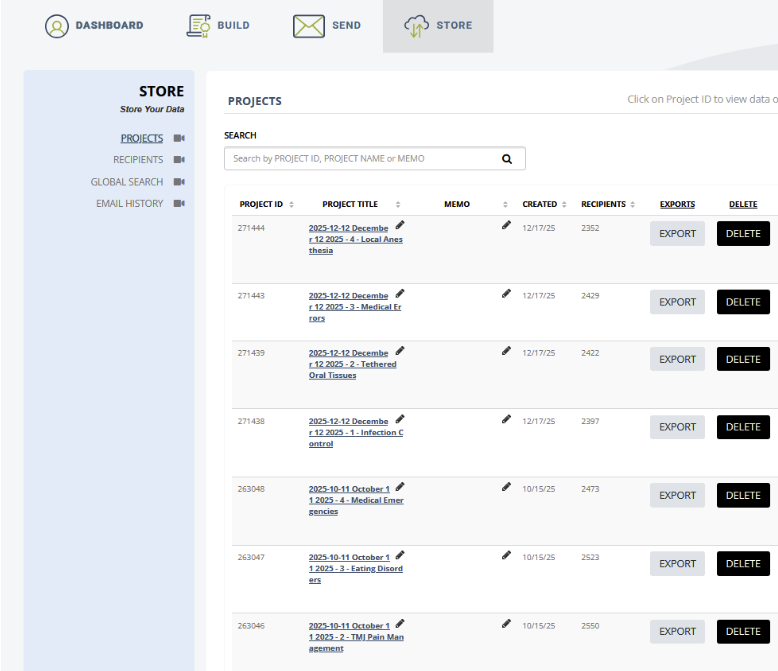
Store Multiple Certificates in Bulk
SimpleCert offers a secure database with SOC 2 Compliance for organizations seeking industrial-grade standards. Through your account, you can track certificates, monitor recipient access, and acquire automated reporting for all your compliance and record-keeping needs.
SimpleCert: Three Tools in One for a Speedy Certification Experience
With SimpleCert’s all-in-one certificate management platform, you can generate, email, and store high-volume digital certificates in just minutes.
No more wasting time with manual Mail Merge or juggling Excel files and Outlook attachments. SimpleCert replaces outdated workflows and frees your team to focus on higher-value tasks with a faster, smarter, and automated solution.
Start today with a free SimpleCert account and experience a streamlined way to build, send, and store multiple certificates, all in one place.